RaceVisor
A downloadable overlay for Windows
This project used to be called ApexDash. The name had to change, and this page replaces it. The old ApexDash page is being taken down rather than left sitting there as a stale download pointing at a name that no longer exists.
If you used ApexDash, RaceVisor is the same project, further along, and your work carries over. An install that predates the rename keeps reading its existing Documents\Apex Dash folder, so your saved layouts are not lost.
WHAT IT DOES
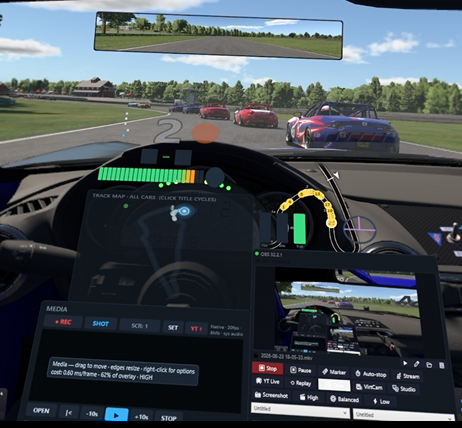
• 30+ widgets — RPM (cluster, horizontal, vertical), shift light, gear, speed, inputs, tires, fuel and engine, timing tower, differential, delta and gap graphs, tire wear trends, fuel consumption, setup comparison, corner pace, G-force, spotter lamps, radar, weather, pit service (sends real pit commands), track map, track progress bar, steering wheel, media controls and five clocks.
• Build your own dashboard — drag to move, drag edges to resize, snap-to-align with guides, group-select and move widgets together. Per-widget opacity, background opacity, font size, typeface and accent color.
• Color dropper — click any pixel on your screen to grab it, so your dash can match your team's colors straight off a livery or a logo.
• 50 ready-made layouts — 20 hand-designed plus 30 "Mega" arrangements that put every widget on screen at once. Start from one, strip what you do not want, save your own.
• Driver Chat — voice and text with other RaceVisor users, completely independent of the sim's own comms, so it works across different sims and while you are still in the menus. Push-to-talk on a wheel button, open mic, per-driver mute, and the addresses to give your friends are shown right on the widget.
• Real VR, not a screenshot — runs inside OpenKneeboard with a drawn cursor so you can see your mouse in the headset. Editing in VR is built to equal editing on the monitor: visible resize handles, an adjustable grab zone, sticky drag, and a properties panel drawn inside the overlay so you never lose sight of the dash you are editing.
• Track maps learned from your own laps — no GPS, dead-reckoned from speed and heading over one clean lap. There is also a flat track-progress bar that needs no map at all, so it works on lap one of a track you have never driven.
• Community Track Library — opt in and the first driver to learn a track is credited forever as its Track Pioneer, in the app and on the website.
• Capture and stream — MP4 recording of screen plus overlay, screenshots, YouTube upload with the session details already filled in, and OBS control from inside the overlay.
• Full controller support — bind any overlay action to your wheel, gamepad or button box.
• Run several at once — a monitor overlay, a headset overlay and an OBS feed, each on its own layout. That is unusual and it is deliberate.
It reads the sim's shared memory read-only at 60 Hz and draws through Direct3D 11 and Direct2D, so it stays light, around 2% of a 12-core CPU, about half a thread. There is a 30 Hz low-power mode for weaker machines.
SIM SUPPORT
• iRacing — everything works, no setup. This is what RaceVisor is built around.
• Assetto Corsa — monitor and VR. No opponents, best-lap delta or clutch, because AC does not publish them.
• Assetto Corsa Competizione — monitor and native VR. Same data limits as AC, they share the telemetry interface.
• Automobilista 2 — monitor overlay with full data including opponents. One setting to switch on: Settings > System > Shared Memory set to "Project CARS 2", which ships off. VR kneeboard is currently unavailable on Quest/Link, an OpenKneeboard limitation rather than a RaceVisor one.
• rFactor 2 — monitor and VR, full data including opponents. Needs The Iron Wolf's rF2 Shared Memory Map Plugin installed once.
With no sim running, RaceVisor shows clearly labeled demo data, so you can build and tune layouts any time.
Download
Click download now to get access to the following files:
Leave a comment
Log in with itch.io to leave a comment.